Ergonomic equipment on a small budget: what actually helps
· 6 min read
The short answer
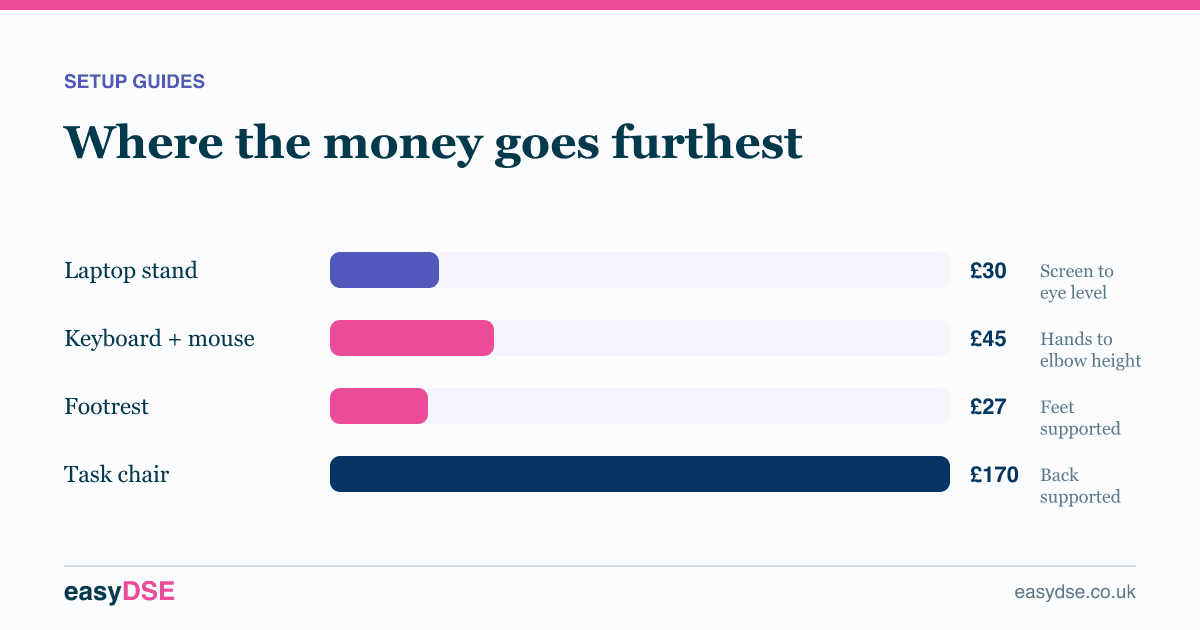
Spend on a laptop stand, separate keyboard and mouse, and a footrest first. Those resolve most findings for under a hundred pounds a head. A proper chair is the next tier. Standing desks and premium accessories come last.
Small businesses kitting out home workers usually ask the same question: what do we actually have to buy? The honest answer is less than most suppliers would like you to think, and the order matters more than the total.
First: fix the free things
Before buying anything, run through the adjustments. Chair height set from the desk. Mouse brought in close. Keyboard laid flat. Screen raised and centred. Desk turned so the window is to the side.
In a typical assessment, somewhere around half the findings are resolved by adjustments alone. Buying equipment to work around a badly set chair is money wasted.
Tier one: under a hundred pounds a head
| Item | Typical cost | Fixes |
|---|---|---|
| Laptop stand | £25 to £60 | Screen height, neck load |
| Separate keyboard | £20 to £40 | Shoulder shrug, wrist extension |
| Separate mouse | £15 to £35 | Trackpad strain |
| Footrest | £25 to £45 | Unsupported feet after raising the chair |
This tier resolves the majority of home working findings. If you buy nothing else, buy these.
Tier two: the chair
A chair is the biggest single line item and the one most worth getting right. Schedule 1 requires adjustable seat height and adjustable backrest height and tilt, so a fixed dining chair does not comply however comfortable it feels.
A serviceable adjustable task chair with lumbar support starts around a hundred and fifty pounds. Spending four figures buys durability and finer adjustment, not a different legal position.
Tier three: only if the assessment says so
- Monitor arms. Excellent, and mainly a desk space and flexibility win rather than a health one if a riser already gets the height right.
- Sit-stand desks. Real benefits for people with back symptoms or very long screen days. Not a default purchase.
- Vertical mice and split keyboards. Buy where there are actual upper limb symptoms, not preventively for everyone.
- Document holders. Cheap and genuinely useful for anyone working from paper alongside a screen.
- Headsets. Essential for anyone on the phone more than an hour a day while typing.
What to be sceptical about
Anything sold on posture correction rather than workstation fit deserves caution. Posture braces, balance boards and kneeling stools have enthusiastic followings and thin evidence for general use. They are not what the regulations ask for, and they are not where a limited budget should go first.
Buying for a team
- Assess first, so you are buying against findings rather than guessing.
- Standardise on two or three items you issue by default to laptop users.
- Keep a small stock rather than ordering individually, which cuts both cost and delay.
- Record what you issued and when. That record is part of showing you acted on the assessment.
Frequently asked questions
What ergonomic equipment should a small business buy first?
A laptop stand, separate keyboard and mouse, and a footrest. Those resolve most common findings for under a hundred pounds a head.
Do employers have to pay for home office equipment?
Where an assessment identifies a risk, the employer has a duty to reduce it. In practice that usually means providing the equipment needed to fix the finding.
Are standing desks required?
No. They help some people, particularly those with back symptoms or very long screen days, but they are not a legal requirement or a default purchase.
Assess your own workstation, free
Eight minutes online, with a report you can act on.
Read next
This article is general information about UK health and safety law, not legal advice. Check the current position on the HSE website and take advice where the stakes justify it.