DSE assessments for small businesses: what UK law actually requires
· 8 min read
The short answer
Every UK employer must assess the workstation of anyone who uses a screen as a significant part of their job, act on what the assessment finds, and keep a record. There is no small business exemption, and a free self-assessment satisfies the duty as long as you act on it.
If you employ anyone who spends a good part of their day at a screen, you have legal duties under the Health and Safety (Display Screen Equipment) Regulations 1992. Those duties apply whether you have three employees or three thousand. There is no small business exemption, no headcount threshold, and no version of the rules that lets you skip it because everyone works from home.
The good news is that the duties are narrower and more practical than their reputation suggests, and you can meet most of them for nothing.
What the regulations cover
Display screen equipment means any alphanumeric or graphic display screen, whatever technology sits behind it. Desktops, laptops, tablets used for work, screens in vehicles, screens in control rooms. The definition is deliberately broad so it does not date.
The duties attach to people the regulations call users: employees who habitually use DSE as a significant part of their normal work. There is no statutory hour threshold, which trips a lot of employers up. HSE guidance points at people who normally use a screen for continuous spells of an hour or more, use it more or less daily, need to transfer information quickly to or from the screen, or need high concentration while doing so.
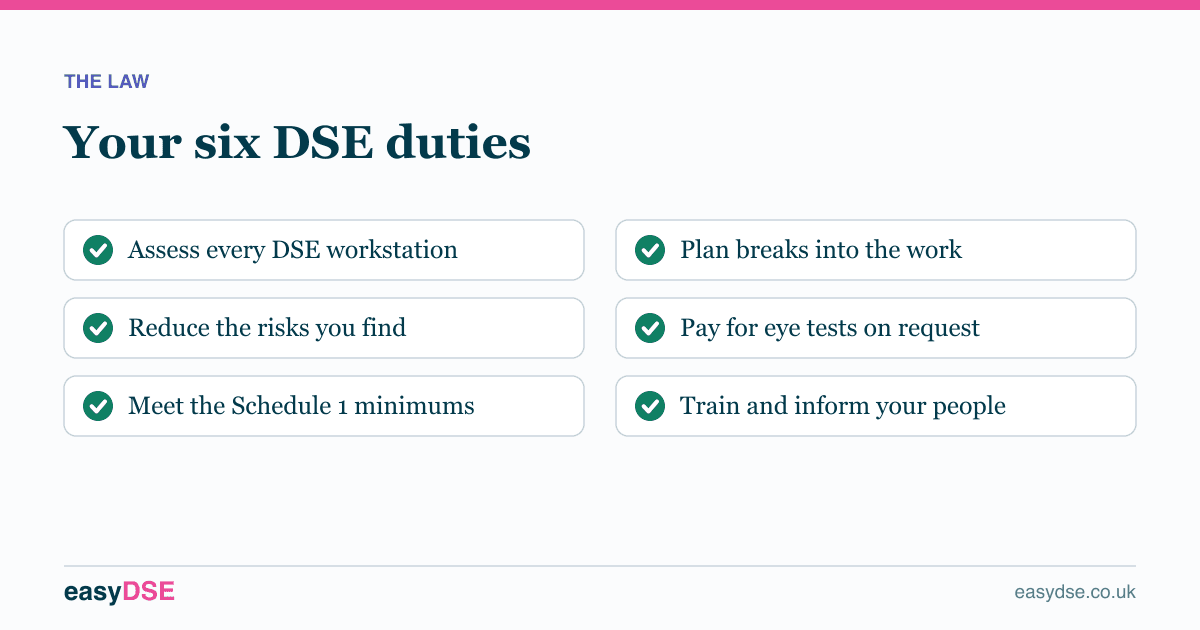
Duty one: assess the workstation
Regulation 2 requires a suitable and sufficient analysis of every workstation used by a DSE user, to assess the health and safety risks. It does not say who has to carry it out, and it does not require a consultant.
A self-assessment completed by a trained user is a recognised way of meeting this, and it is what most UK employers use. The two conditions are that the assessment is thorough enough to surface real risks, and that somebody in the business reviews it and acts on what it says.
Duty two: reduce the risks you find
This is the duty that actually matters, and the one small businesses most often miss. Identifying a risk is not compliance. Reducing it is.
Duty three: the Schedule 1 minimums
Schedule 1 sets out minimum requirements for the workstation itself. Most are common sense once you read them:
- Screen
- Clear and stable image, adjustable brightness and contrast, tilts and swivels easily, free of glare and reflections.
- Keyboard
- Separate from the screen and tiltable, with space in front to rest the hands, and legible key symbols.
- Work surface
- Large enough, low-reflectance, allows flexible arrangement of equipment, with a document holder where needed.
- Chair
- Stable, allows easy movement, adjustable in seat height and backrest height and tilt. A footrest on request.
- Space
- Enough room to change position and vary movements.
- Lighting
- Satisfactory, with appropriate contrast between screen and surroundings, and glare prevented.
- Environment
- Noise, heat and humidity kept at levels that do not distract or cause discomfort.
- Software
- Suitable for the task, easy to use, and responding at a speed suited to the user.
One part of the software requirement surprises people: you must not use software to check a user’s quantity or quality of output without their knowledge. Silent productivity monitoring of DSE users is specifically out of bounds.
Duty four: plan breaks into the work
Regulation 4 requires you to plan DSE work so it is periodically interrupted by breaks or changes of activity. There is no prescribed schedule, and the regulations deliberately avoid one.
The guidance is consistent on the shape of it: short and frequent beats long and occasional. Roughly five minutes away from the screen every hour does more good than twenty minutes every three. Breaks should be taken before fatigue sets in, not as a remedy for it.
Duty five: eye tests
Under regulation 5, a DSE user who asks for an eye and eyesight test is entitled to one at your expense, and to repeat tests at appropriate intervals afterwards.
If the test shows the person needs glasses specifically for the screen distance, you have to pay for a basic pair. You do not have to fund a general prescription, and you do not have to pay for designer frames. A basic pair that does the job is the standard.
Duty six: training and information
Regulations 6 and 7 require health and safety training on the workstation before someone uses it, repeated when the workstation is substantially modified, plus information about the assessment, the measures you have taken, and their entitlement to eye tests and breaks.
A good assessment tool does a lot of this work for you, because explaining why a finding matters is training. It does not replace telling people what their entitlements are.
What it costs to comply
Less than most small employers assume. The assessment itself can be free. The most common fixes are adjustments rather than purchases: lowering armrests, raising a chair, moving a mouse closer, turning a desk away from a window.
Where equipment is genuinely needed, the items that resolve most findings are inexpensive. A laptop stand, a separate keyboard and mouse, and a footrest will between them fix the majority of home-working problems for well under a hundred pounds a head.
Where small businesses go wrong
- Assuming the rules are for big companies. They are not.
- Assessing office desks and ignoring home setups.
- Treating the assessment as the deliverable, rather than the changes it prompts.
- Keeping no record, then having nothing to show when asked.
- Never repeating it, so the record ages out and no longer describes how anyone works.
Frequently asked questions
Do I need a DSE assessment if I only have two employees?
Yes. The regulations apply to every employer regardless of size. There is no small business exemption and no headcount threshold.
Can I do a DSE assessment myself or do I need a consultant?
You can do it yourself. A self-assessment completed by a trained user is a recognised approach, provided someone reviews it and acts on what it finds. Consultants are useful for complex cases, existing injuries and specialist adjustments.
How much does a DSE assessment cost?
It can cost nothing. Free online self-assessments cover the legal requirements. The cost usually comes from acting on the findings, and most of the common fixes are adjustments rather than purchases.
Assess your own workstation, free
Eight minutes on any phone, with a report you can act on.
This article is general information about UK health and safety law, not legal advice. Check the current position on the HSE website and take advice where the stakes justify it.